genimg is an agent and human native CLI for image generation. At the core, it simplifies image generation across a range of models, and enables agents and humans to communicate ideas visually.
I’ve been meaning to publish it for a long time, but haven’t had the chance until now. This post will focus on the workflows genimg unlocks and the ideas around it. I use it daily with agents to explore ideas visually and to have agents communicate visually with me, among other uses you’ll see below. genimg is mainly a tool for developers, but I could see anyone that uses agents getting value out of it. I’ll briefly go through the developer workflows, such as reviewing large agent outputs (e.g. PRs, research/exploration), then go into the wider context around the tool.
Rather skip the developer part? Jump to Motivations & wider context. For every detail, the docs are at genimg.luischav.es.
Image generation workflows, skills and visual tools
I am not one who’s interested in generating images for creating artistic-looking pieces, I’d rather to leave that to humans. Because of that I’m mostly not interested in photorealism, but I still get a lot of value out of image generation models.
The one thing I really care about is getting more out of computers, and designing interfaces and tooling that work with our attention and cognitive abilities. I also care about design & accessibility and I am very picky about how visual interfaces (UI, GUIs, etc.) should look and feel like. To these ends, image generation is extremely useful.
As of this first release, genimg enables several workflows I’ve used daily since creating it in April 2026:
CLI use
Install:
uv tool install genimg First use
genimg setup
genimg "a paper-cut fox, warm palette" \
  --model gdm:nb2 \
  --output fox.png
All images go to ~/.genimg/generations/ and you can view your history via genimg history view, or genimg history for the non-interactive version.
Image generation models rarely hit the spot right away. Flags such as --diverse or --deltas allow you to explore different visual options for a single prompt, speeding up how quickly you find your design of choice.
You can use it with Gemini (Nano Banana) and OpenAI (gpt-image) models through several providers: GCP Vertex or a Gemini API key for Google, OpenAI or Azure for OpenAI, plus Codex with a ChatGPT subscription. I know many other models exist but these have thus far been the leading ones so I’ve stuck to them.
For more, read the docs at genimg.luischav.es.
Agent skills
npx skills add lucharo/genimg/genimg: simply describes the mechanics of the CLI for agents to operate/genimg-preferences: pairs with/genimgbut separates preferences from mechanics and it’s created when the (human) user first expresses preferences; skill updates never overwrite it./genimg-infographic: forked from baoyu-infographic, which is used in the Hermes repo for creating graphics in PR descriptions and product releases/updates. Great skill for creating infographics with image generation models. I stripped the codex:image-gen calls and scripts as well as the instruction to ask for preferences every time, keeping just the instructions and mechanics./genimg-visual-review: I use this on every PR I create or review with agents. You get a poster/diagram of the PR’s changes, plus the key changes in text, potential risks and a “what needs you” panel. Uses/genimg-infographic/genimg-visual-exploration: similar to/genimg-visual-reviewbut for the beginning stage of an agent session or when you want to explore many options at once. A bit like theAskUserQuestiontool but visual./image-to-app: a “visual interview” much like I’d imagine working with a designer. Uses grill-with-docs by Matt Pocock. Instead of creating wireframes or scrappy designs via Claude Design, generate images of your mobile (e.g. iOS) or web application progressively. Starts with an overall visual direction then focuses on the different screens. Uses the grid to explore options.
Visual tools
- image review tool (grid & carousel): a simple HTML page that shows multiple images at once, useful for reviewing several image outputs. Simply run
genimg "…" --num 4 --gridorgenimg grid a.png b.png --output picks.html.- tournament: when focus runs low and you can’t decide, click the Tournament button to start one and surface your top picks.
- Draw Studio: an image is worth a thousand words.
genimg drawspins up a server with a whiteboard, prompts image models visually rather than only via text to get your desired visual output more effectively/quickly (it works even if you can’t draw, I promise. LLMs won’t judge).
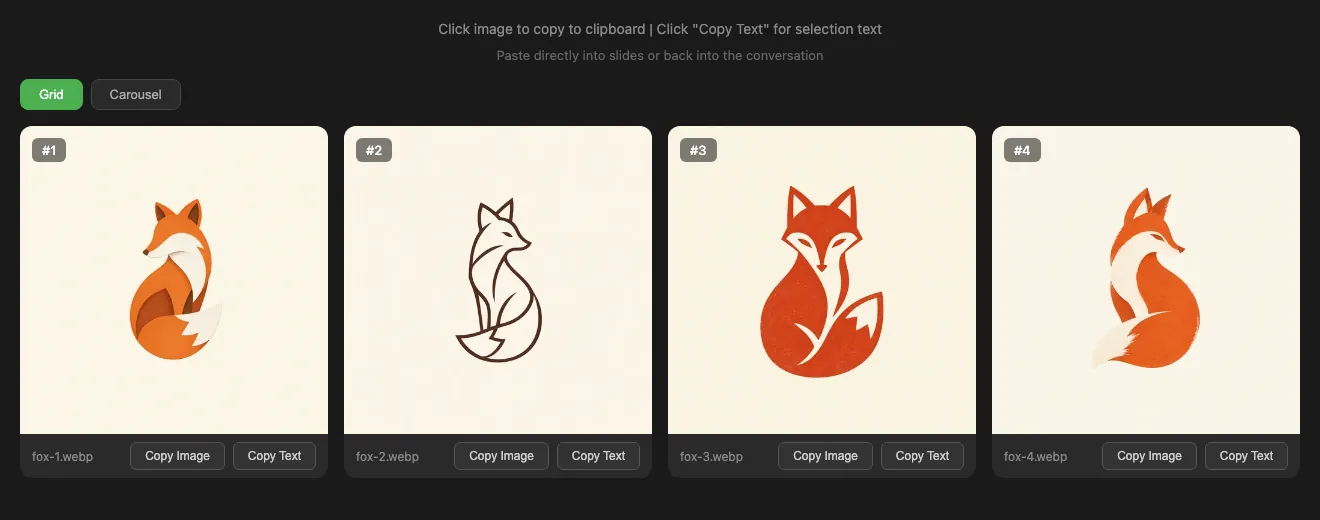
genimg grid: four takes side by side, ready to compare.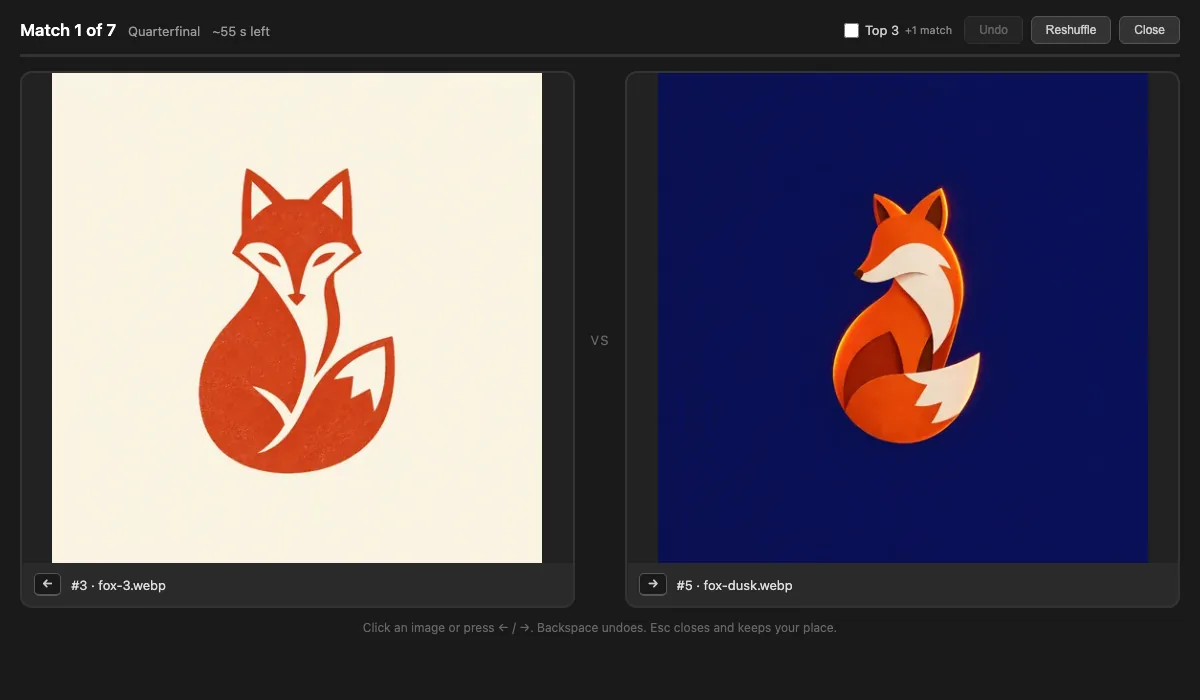
genimg grid tournament: two candidates at a time until you have a winner, or a top three.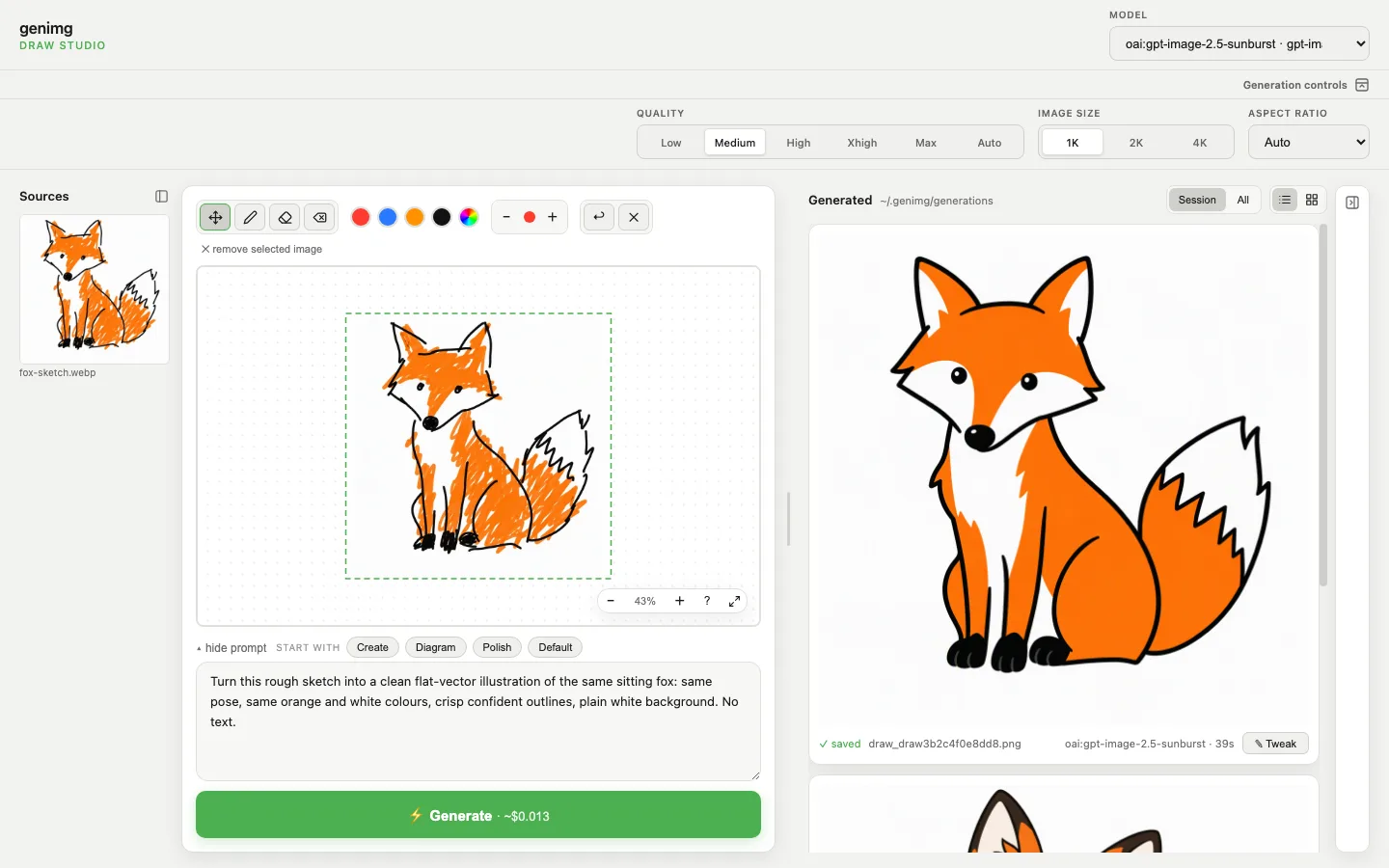
genimg draw: a rough sketch on the canvas (left) and the image generated from it (right).Motivations & wider context
The need for AI to communicate visually
I’ve been using agents for coding for the last 2 years, since Windsurf, before it was acquihired1. And despite my best book and blog-reading efforts in that time I’ve probably read much more AI-generated text than human-written text. In the AI-psychosis madness of November/December 2025, with the launch of Opus 4.5, agentic use really took off and I was running lots of sessions in parallel. When you’re “in the zone”, in flow or hyperfocus, you’re like wired to the screen and it feels good, you feel like you’re keeping up and getting so much done. Then you hit a wall, maybe your glucose is low or you haven’t stood for a while. Suddenly you’re looking at these walls of text and understanding nothing, you’re overwhelmed, it all looks the same.
At this point it’s probably best is to go for a walk, call a friend, eat some food and get away from your laptop and phone. I’m sure it can wait.
That phase of AI psychosis faded, but we still work with many agents at once, switching context and managing them from higher and higher levels. Reviewing minute outputs (e.g. lines of code) becomes impractical, so we find ourselves needing take a bird’s-eye view of the agent’s output.
For this we’ve needed to go beyond these walls of text and traditional chatbot interfaces, ideas I’m passionate about and explore in thenew.computer2. I go further into this idea in “The End of Scrolling”3. Our brains have a much higher information bandwidth and resource allocation towards visual processing (roughly a quarter to a third of the cerebral cortex, per Van Essen 20034). Think of how quickly you recognise a familiar face. Going forward, creating images for agent-to-human communication will continue to be useful. The AI industry (at least in the West) is no longer pursuing video generation models (Sora shutdown5). Still, the latest models are really good at creating 3D graphics via code: Scalable Vector Graphics (SVG), D3.js, Blender or code-video frameworks such as hyperframes. See this example from VC Deedy Das (post) or Simon Willison’s explorations (pelican benchmark, Blender).
A trend earlier in the year was for agents to create HTML artefacts (unreasonable HTML — Anthropic, Karpathy tweet, others), but agents can happily default to creating an HTML page full of text. Image generation models are the other avenue. Why write code when you can just generate pixels? The image generation models from gpt-image-2 onwards have represented a big leap in capabilities (see the chart below). Sometimes HTML or image generation alone is enough, and you can also combine both, which is what genimg does.
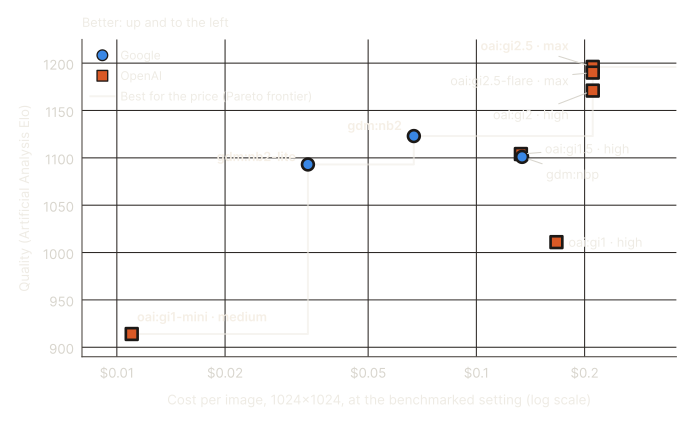
genimg supports. Quality: Artificial Analysis text-to-image leaderboard, 25 Sep 2026.Why are we prompting image models with words? Just draw.
I’ve never been good at drawing but have always thought visually, in diagrams, (mind)maps, sketches, etc. When communicating ideas with others I’ve always cared about showing things visually, making them see what I see in my mind, but I’ve largely been unable to.
Image generation models have given me a chance to express all this. Yet I initially found myself describing in minute detail the positioning of an element of an image at a particular distance from another one and other really nitpicky visual details. One day I realised I could just draw. Modern image generation models are multimodal in input (some in output too) and can take input images along with text, so I can express ideas with a sketch alongside text. And so genimg draw was born.
For this inspiration I have to thank Vincent Warmerdam (@koaning online), currently on the marimo team and creator of projects such as calmcode.io and really great tutorials where he sketches over his laptop screen with a Wacom tablet. This method of teaching (also seen in classics like Khan Academy videos from 15 years ago) is a great tool for education and more broadly for conveying ideas and directing the focus of the viewer/student/audience. Vincent’s work really inspired me to start thinking about “input devices”, and all the ways we interface with computers (keyboard, mouse, touch), which have recently expanded massively with the advent of agents and voice transcription (voice, sketching).
The cost of not sharing tools early in the age of agentic coding
A small note on building tools for others in the age of AI and sitting on tools until it’s nearly too late.
Software is more personal than ever but also less shareable (future post); everyone can fork a repo and have agents personalise such a tool for them now that the cost of code generation and maintenance has sunk. This really hinders development of open source (and shared) tools as well as distribution/sharing. On the developer’s side, there’s always one more feature they can develop and they can converge towards overly opinionated features that won’t “scale” with other users. On the user’s side, they can just fork and never contribute back to the original repo and potentially the communities sustaining it; they might not even report feedback or issues they find.
I was hit by the first one: genimg was so tightly coupled to my workflows and skills that I kept personalising it to a degree that it was impossible to share; it was never quite finished. I’d talk about these useful workflows with colleagues but never shared it.
Then ChatGPT launched their GPT-image-2.5 models as well as a new tool in the ChatGPT app called “Sketch”. This upset me. It was the same idea as genimg draw, which I was really fond of, but far more polished and distributed to the masses, who would soon enough take this novel way of interacting with computers for granted. About two months after I created draw, my idea was still scrappy and developer-facing, but neat still. I was forever close to release, but never close enough. Once OpenAI’s ChatGPT shipped the same idea with the new models, PR and marketing videos, it didn’t feel novel anymore and had become commoditised. At this point, this cycle of innovating agentic use-cases and workflows only to see it absorbed into the mainstream apps feels very familiar, and I’ve seen others go through the same tropes.
This in turn pushed me towards finishing genimg and publishing, but why did I have to wait so long?
Conclusion
I am excited to have finally launched genimg and I hope others find it useful, as I have for months. I’ll keep using it daily, improving it and maybe coming up with new ideas. Try it, break it and give feedback. And if you’re sitting on an unreleased tool that you’re excited about, maybe this is a good reminder to push it to completion and share it with others.
If you’ve made it this far, I hope this post has taught you something or given you a fresh perspective as we collectively navigate how our interaction with computers is radically changing because of agents and AI progress.
Google hired Windsurf’s CEO and senior staff in a $2.4 billion deal, July 2025. CNBC↩︎
A project exploring what future human-computer and human-AI interfaces could look like. thenew.computer↩︎
We’ve been stuck with AI-as-chatbots since the 1960s. It’s time for a change! luischav.es↩︎
About 27% of human cerebral cortex is predominantly visual. Van Essen, 2003. PDF↩︎
OpenAI closed the Sora app on 26 April 2026 and its API on 24 September 2026. OpenAI↩︎